
Robocat Casino Mobile App – Play on the Go
If you love playing on your phone, Robocat Casino is fully set up for mobile so you can spin, bet and cash out from pretty much anywhere. No need to download the Robocat app.
You do not need to be at a desktop to enjoy RoboSlot, tournaments, casino or sports; everything runs smoothly in your browser on modern devices.
Introduction to Mobile Gaming
Mobile gaming at Robocat is meant to feel like the full site, just packed into your pocket.
You still get secure logins, responsible gaming tools and access to support directly from your phone or tablet.
Now, the same real money rules apply on mobile as on desktop, including age verification and country restrictions, so you must be at least 18 and in an allowed jurisdiction to play.
Robocat Mobile Experience
On mobile, you get the same navigation structure, with quick access to Casino, Live Casino, Jackpots, Sports and promotions from the main menu.
RoboSlot, Bonus Crab, Wheel of Fortune and tournaments are also available, so you are not missing any of the fun features when you switch to your phone. No need to download the Robocat app.
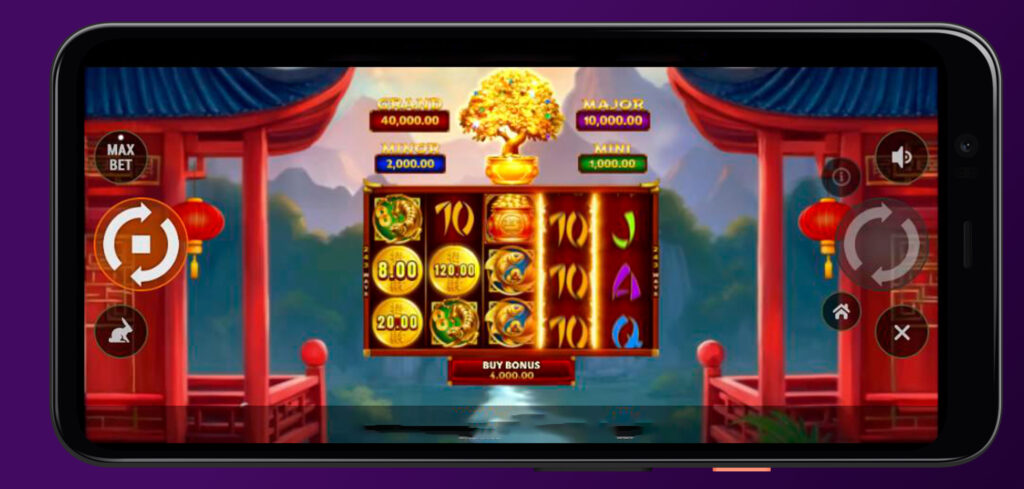
How to Install Application?
Let’s talk about “installing” Robocat on your phone, which currently works through a shortcut-style web app that launches the mobile site with one tap.
You can use the “Create Shortcut” option in the footer menu on supported mobile browsers to pin Robocat straight to your home screen.
Basic install-style steps:
- Open Robocat in your mobile browser and scroll to the footer.
- Tap “Create Shortcut” and follow your browser’s on-screen instructions.
- Confirm adding the icon to your home screen.
- Launch Robocat next time directly from that icon, like a regular app.
Bottom line, you get a Robocat Casino app-like experience without downloading anything from an external store.
Compatible Devices and Browsers
Robocat Casino’s mobile site is built for modern smartphones and tablets with updated browsers.
If you are using current versions of Chrome, Safari or other major browsers, you will get the full responsive interface, including live chat and cashier.
Typical compatibility Robocat Casino app-like experience:
- Android phones and tablets with a modern browser (Chrome or similar).
- iOS devices like iPhone and iPad use Safari or Chrome for Robocat Casino.
- Desktop browsers, if you just resize the window or use mobile view, though that is optional.
- Any device that can handle secure HTTPS, HTML5 casino games and streaming live casino video.
If your browser feels outdated or struggles with game loading, updating it usually fixes most issues.
Mobile Site Navigation
Now, once you are in Robocat Casino, navigation on the app is all about side menus and clear sections.
You can open the sidebar to jump straight to Casino, Live Casino, Jackpots, Sports, promotions, tournaments, VIP and payments.
Key Robocat Casino mobile sections:
- Casino and Slots for all slot, arcade and table game categories.
- Live Casino for roulette, blackjack, Gold Saloon, game shows and more.
- Sports, Live Betting and Virtual Sports for pre-match and in-play betting.
- Promotions, Tournaments, VIP and Guide for bonus info and RoboSlot tips.
You can also access Help Centre and Live Chat right from the footer on mobile, which is handy if you get stuck.
Mobile Casino Games
Let’s dig into what you can actually play in the Robocat Casino app.
All major categories are available, from regular slots and Megaways to jackpots and instant games.
Mobile Slots
Robocat Casino’s slot lobby is fully mobile-ready, with filters for Top, New, Popular, Exclusive, Bonus Buys, Megaways, Live Games, Arcade and more.
Games load in HTML5, so you do not need extra plugins, and you can spin in portrait or landscape depending on the title.
Robocat Casino mobile slot highlights:
- Access to “Top”, “New” and “Popular” games in one tap.
- Exclusive titles you will not see on every other site.
- Bonus Buys and Megaways collections for high-action sessions.
- Instant Games and Arcade options if you like quick rounds.
If you like mixing short sessions across different providers, the mobile lobby makes it fast to swap between favourites.
Mobile Live Casino
Mobile live casino is where you can jump into Gold Saloon, roulette, blackjack, game shows and more with streaming optimised for smaller screens.
Tables like Roulette, Blackjack, International tables, Game Shows, Baccarat, Dice and Poker are all listed by category.
Main live casino sections:
- Top Live Casino Games for the most played tables.
- Gold Saloon for themed blackjack, roulette and other western-style rooms.
- Roulette and Blackjack tabs for classic staples.
- Game Shows and Baccarat & Dice for more variety.
You can place bets, switch tables and use live chat on your phone, just like on a desktop.
Mobile Sports Betting
Now, if you are into sports, Robocat’s mobile Sports and Live Betting sections keep the full sportsbook in a compact layout.
You can navigate from Sportsbook to Live Betting and Virtual Sports, then drill down to football, tennis, basketball, ice hockey, table tennis, American football, baseball and dozens of other sports.
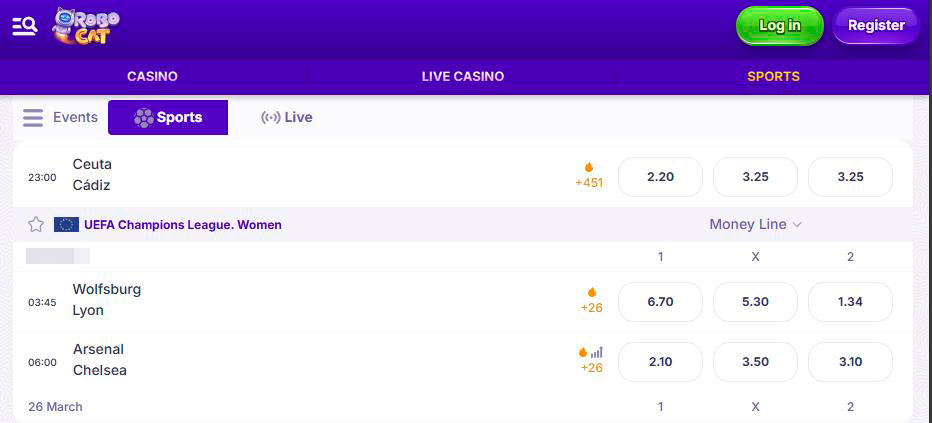
On mobile, markets, odds and betslips are all touchscreen-friendly, so you can build singles and multis without feeling cramped.
Mobile Account Management
Here’s the nice part, almost everything you need to manage your Robocat account is available on mobile, including verification, limits and cashier.
You can update details, set responsible gaming limits and contact support directly from your phone.
Deposits on Mobile
Deposits on mobile use the same payment gateway as desktop, with a clean list of cards, e-wallets, bank transfers and crypto where available.
Minimum and maximum amounts depend on the method; for example, Visa withdrawals in Germany run roughly from 10 € to 3,000 €, while some wallets or crypto methods go up to 5,000 €.
Common mobile payment options:
- Visa and Mastercard cards.
- Bank Transfer and Revolut via Bank Transfer.
- E-wallets like Jeton and MiFinity.
- Crypto options such as Bitcoin Cash, DOGE, Ripple, USDC, Cardano and USDT TRC20.
All transactions are processed through secure gateways and may require additional KYC checks according to the Terms.
Withdrawals on Mobile
Withdrawals are just as simple, and wherever possible, Robocat sends money back through the same method used for deposits.
You can request payouts, track status and see available limits straight from the mobile cashier.
Typical mobile withdrawal details for Robocat APK:
- Visa and Mastercard: usually around 10 € to 3,000 € per transaction.
- Bank Transfer, Revolut, Jeton and MiFinity: often up to 5,000 € depending on method.
- Crypto withdrawals like BTC Cash, DOGE, Ripple, USDC and others: mostly in the 10 € to 5,000 € range in euro equivalent.
Just remember that account verification and anti-fraud checks can delay withdrawals if requested documents are still pending.
Bonus Activation
Robocat Casino bonus use on mobile works exactly like desktop, without an application, with casino and sports promotions visible under the Promotions area and in your account.
You can grab welcome offers, reloads and special promos, then track wagering progress from your phone.
Mobile bonus basics:
- Opt in to promos or enter codes where required, usually at the deposit stage.
- Respect the same wagering periods of 10 days for the casino and 30 days for sports.
- Remember the 40x wagering and 80 € cap for no-deposit free spins, and 40x with 5x max cashout for no-deposit bonuses.
- Check that your bonus shows as active in the bonus section before you start playing.
If anything looks off on a small screen, you can still open the full bonus terms from the footer to double-check the rules.
Benefits of Mobile Play
Now, why bother with a Robocat Casino application at all when you have a laptop at home?
The big win is flexibility, since you can spin RoboSlot, clear wagering or place a live bet whenever you have a few spare minutes.
Main perks of the Robocat mobile:
- App-like shortcut experience without store downloads.
- Full access to casino, live casino, sports and promotions on one device.
- Same payment options and limits as desktop, including cards, wallets and crypto.
- Direct access to the Help Centre and live chat when something needs a human.
Honestly, once you pin the shortcut and log in once, it is very easy to treat your phone as your main Robocat hub.

FAQ
Right now, Robocat runs as a mobile web app that you can add as a shortcut from the “Create Shortcut” option in the Robocat footer, rather than a separate app store download.
Yes, the RoboSlot guide, Energy system, tournaments and Reward Calendar are all available on mobile, and you can spin, raid, attack, and collect rewards just like on desktop.
Yes, deposits and withdrawals are processed through the same encrypted payment gateway as desktop, using providers like Visa, Mastercard, bank transfer, Revolut, Jeton, MiFinity and several crypto methods.
No, casino and sports bonuses follow the same Terms, including 10 days for casino wagering, 30 days for sports and the usual 40x plus caps for no-deposit offers, regardless of device.
You can access responsible gaming settings, see general terms and open the Responsible Gaming page from your mobile browser, so you can set limits and self-exclude without needing a desktop.